Every event organiser ends up doing the same list of small jobs that never quite justify buying software for. Turning one event date into a working calendar link for five different apps. Slapping a countdown clock on a landing page. Making a QR code that isn't a generic black-and-white square. Tagging a dozen campaign links the same way so the analytics report doesn't fall apart. None of it is hard, exactly — it's just fiddly, and it eats an afternoon you don't have.
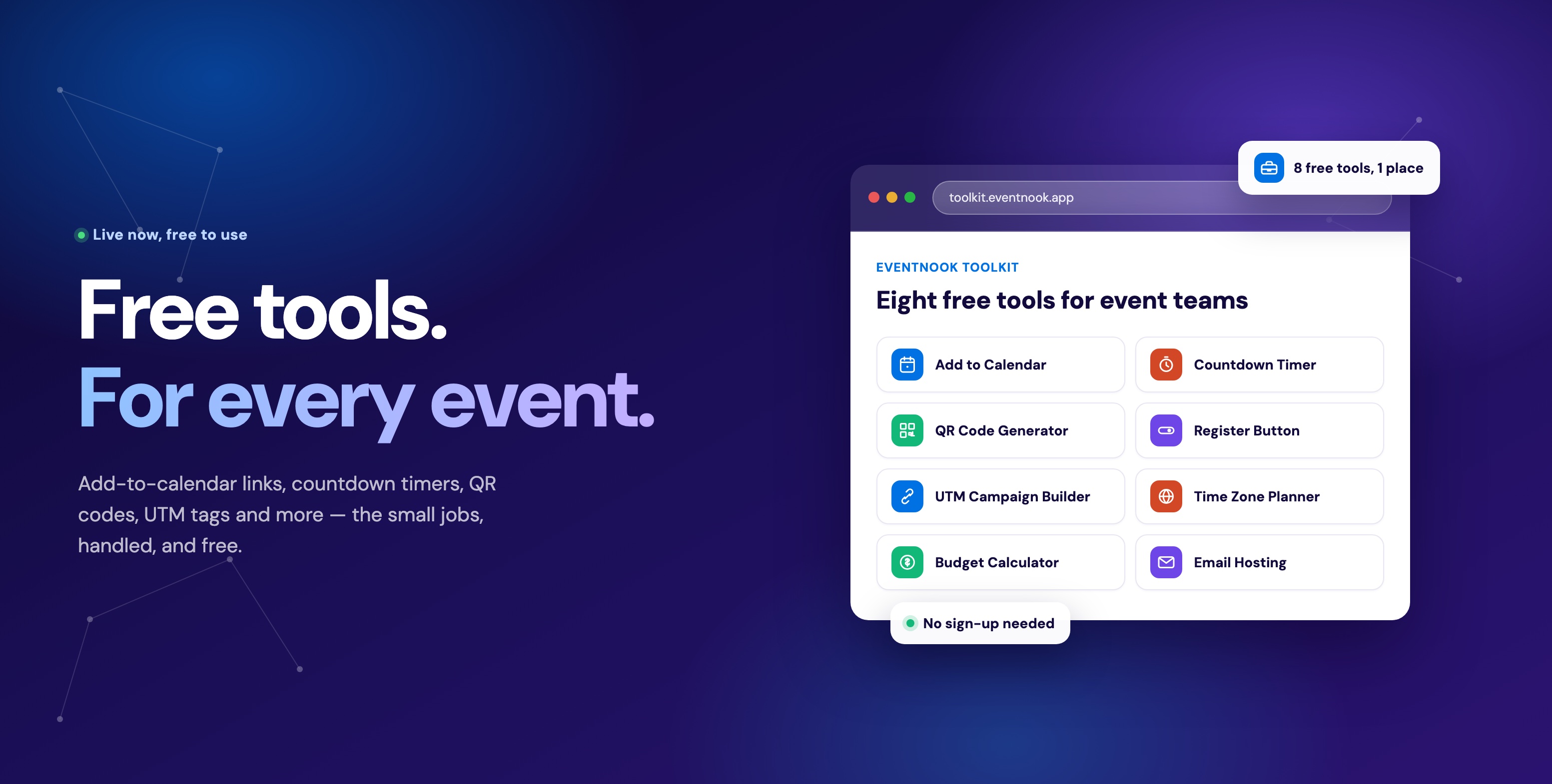
So we built a free toolbox for exactly that, and put it online for anyone to use:
Fill in one form, copy out a link or a snippet, and the job is done — no software to buy, no account required, and no afternoon lost to it. Here's what's inside.
What's in the toolkit
Fourteen tools, each solving one job completely rather than half-solving all of them:
| Tool | What it does |
|---|---|
| Event Landing Page | Banner, countdown, add-to-calendar and a register button, bundled onto one page you can publish in minutes. |
| Add to Calendar | One link, every calendar — Google, Outlook, Office 365, Yahoo and Apple, generated from one form. |
| Countdown Timer | An embeddable, timezone-aware ticking clock that builds urgency on any page. |
| QR Code Generator | Branded QR codes — with your own colours and logo — for tickets, signage, check-in, WiFi, vCards and PayNow. |
| Register Button | Call-to-action buttons that render correctly in Outlook, not just Gmail. |
| UTM Campaign Builder | Consistently tagged links across every channel, so ticket sales attribution doesn't fragment. |
| Social Preview Checker | See how a link will look on LinkedIn, Facebook, X and WhatsApp before you post it, not after. |
| Email Signature | A signature with your photo and social links that still renders correctly in Outlook and Gmail. |
| Event Agenda | Sessions, speakers and rooms in a layout that updates itself the moment you change a detail. |
| Time Zone Planner | A grid that shows which session times actually work across every region you're inviting. |
| Digital Business Card | A shareable contact page with one-tap "save to contacts," printable as a QR on a badge. |
| Event Budget Calculator | Break-even analysis from fixed costs, per-attendee costs and ticket pricing. |
| Email Template Hosting | A "view in browser" page for campaigns, for whenever Outlook mangles the layout. |
| Bulk QR & API | Generate hundreds of QR codes from a list, or wire QR generation directly into your own registration flow. |
Every tool is free to try with no account, and nothing you build disappears if you skip signing up. The difference is what a free account unlocks: for embeds like the calendar links, countdown and register button, it upgrades to a permanent link you can update later without touching the page it's on. For the tools that need somewhere to actually live — the landing page, the agenda, the digital business card, and email template hosting — a free account is what publishes the page in the first place, since there's no page to embed without one.
Add to calendar — one link, every calendar
Fill in the event details once — title, location, date and time with timezone handling — and get back working "add to calendar" links for Google, Outlook, Office 365, Yahoo and Apple, plus a shareable page, an email-ready snippet and a website embed. A free account turns that into a permanent link, so moving the session by an hour updates it everywhere it's already embedded.
We wrote a full walkthrough of this one specifically — the .ics file Outlook and Apple need, plus save-the-date campaigns and events that run across two different venues.
YOU'RE INVITED
Untitled event
Fri, 11 Sept 2026, 9:00 am
9:00 am – 5:00 pm (GMT+8)
That's Fri, 11 Sept 2026, 5:00 pm – 1:00 am (GMT+8) where you are.
Add it to your calendar
Countdown timer — urgency without a plugin
Registration closes in
A free account gives your timer a permanent link, so you can change the date later without editing any page it's embedded on.
The Countdown Timer is an embeddable, timezone-aware ticking clock for any event page — pick a style, a layout, and what happens at zero (a message, a redirect, or hiding it entirely). Output is one line of HTML that works on almost any website builder, with an optional register button built into the same embed.
We wrote a full walkthrough of this one specifically — setup steps, every style option, and the second use case most countdown widgets miss: running it live on the day for Q&A timing and session transitions.
QR codes — for tickets, signage, check-in and payments
The QR generator (also called NookQR) makes a QR for a link, a WiFi network, a vCard, an email, a phone number — and a Singapore PayNow QR code, complete with the SGQR/EMVCo checksum that makes it scan correctly in DBS/POSB, OCBC, UOB and the other local banking apps. Every code can carry your own colours and logo instead of a plain black-and-white square, and downloads as a print-ready PNG or SVG.
We wrote a full walkthrough of the PayNow side specifically — how to generate one, when to leave the amount blank versus fixed, and where a plain QR stops being enough for a ticketed event. For event use, the pattern repeats everywhere: a QR on signage that points to the agenda, one at the registration desk for walk-in payment, one on a badge for check-in.
Want to save your codes and create more? Sign up free
Register button — a call-to-action that survives Outlook
Start from a style
A button that looks right in a browser often collapses in Outlook, because Outlook's rendering engine is Word, not a browser engine, and it ignores most of the CSS a normal button relies on. The Register Button tool builds two versions from one design: a website button with proper hover and focus states, and an email version using VML markup for Outlook alongside standard HTML for Gmail, Apple Mail and Outlook.com — so "Register now" looks the same whichever inbox it lands in. Pick a style (brand pill, soft rounded, sharp, outline, solid dark, urgent), set your colours and text, and copy the two snippets into your website or straight into Mailchimp, HubSpot or Klaviyo.
UTM campaign builder — one naming convention, every channel
Enter a destination URL and your campaign details once in the UTM Campaign Builder, tick which channels you're posting to — email, social, paid ads, press — and get back properly tagged links for every one of them, ready to paste. The tool lowercases and hyphenates every value automatically, which matters more than it sounds: without it, "LinkedIn" and "linkedin" show up as two separate rows in your analytics, and a quarter's worth of campaign data quietly splits down the middle. No account is needed to generate links; a free account lets you save a campaign's link set to reuse for the next event.
Add a channel
Time zone planner — find the slot that doesn't wake anyone at 3am
List the regions your speakers and attendees are actually in on the Time Zone Planner, set a working-hours window and a session length, and the planner lays out all 24 UTC hours as a grid with each region's local time and a "fit" score, so the best start times are visually obvious instead of something you work out on paper with three browser tabs of timezone converters open. Useful for anything with participants split across Singapore, London and New York in the same session.
Event budget calculator — know your break-even before the venue deposit
The Event Budget Calculator takes fixed costs (venue, insurance, anything that doesn't scale with headcount), per-attendee costs (catering, badges, swag) and your ticket types and prices, and returns the minimum tickets you need to sell to break even, a projected surplus or deficit at your expected attendance, and the effective cost per head — the numbers worth knowing before signing a venue contract, not after. It runs entirely free with no account; a free account just lets you save the model and revisit it as vendor quotes come in and the numbers move.
Projected surplus
SGD 0
SGD 49,750 revenue − SGD 31,750 costs
Break-even
0 attendees
Per attendee
SGD 0
51% of the 250-attendee target
Email template hosting — the safety net for "view in browser"
Live preview
Paste your email HTML to see it here.
Hi there,
Registration closes Friday — grab your seat before prices go up.
Register nowtoolkit.eventnook.app/e/partner-summit-2026
Paste your email platform's exported HTML into Email Template Hosting — Mailchimp, HubSpot, Klaviyo, whatever you use — and get back a permanent, public URL that renders it as a proper browser page, with an optional subject line shown above it. That URL is exactly what a "view this email in your browser" link should point to, for the inevitable recipient whose inbox renders your campaign as a wall of broken CSS. Since the page has to be hosted somewhere, this is the one tool in the toolkit that needs a free account from the start.
Event landing page — everything above, on one page
The newest tool in the kit, and the one that bundles the rest: the Event Landing Page builder combines a banner, title, date and venue (with timezone conversion and an embedded map), a countdown that hides itself once the event starts, an add-to-calendar button, and a register button — all on one page you publish without touching a website builder. Pick a theme (Gradient, Light, Dark or Minimal) and a colour, choose whether the calendar button shows as a single button or a dropdown with all five providers, and it's live. A free account is what publishes the page — there's no page to embed without one.
Partner Summit 2026
Fri, 11 Sept · Marina Bay Sands
Social preview checker — see the card before you post it
Partner Summit 2026
partnersummit2026.com
Partner Summit 2026
partnersummit2026.com
Partner Summit 2026
partnersummit2026.com
Partner Summit 2026
partnersummit2026.com
Paste any page's address into the Social Preview Checker and it fetches the page and reads its Open Graph tags — exactly what LinkedIn, Facebook, X and WhatsApp do the moment someone pastes your link — and shows you all four previews side by side before you post anywhere. A missing og:image turns a launch announcement into a grey box, and normally you only find out once it's already live and shared. Nothing about the page you check is saved.
Email signature — one block, every inbox
The Email Signature builder collects your name, title, company and contact details, a photo (uploaded or a public image URL — either way it's hosted for you), and a row of social links, then lays them out image-left, image-right or stacked, with a choice of email-safe fonts and an optional divider rule. An optional banner underneath promotes whatever you're running this month. Export as a Gmail-ready block, an Outlook web/new signature, a downloadable .htm for Outlook desktop, or raw table-based HTML with inline styles for anything else.
Looking forward to seeing you there.
Best,
Jamie Tan
Marketing Lead · EventNook
Event agenda — sessions that update themselves
Opening Keynote
Workshop: Cloud Security
Networking Lunch
Lay out sessions, speakers and rooms in the Event Agenda tool, pick from a Timeline, List, Cards or Table layout (Table adds track columns automatically for parallel programming), and embed it or share the link. Change a speaker or a room at 9pm the night before and the embed updates itself — nobody re-exports a PDF. Toggle banner, speaker bios, descriptions, rooms, tracks and type badges (keynote, workshop, break) independently, and add a per-session "add to calendar" button so attendees can save only the sessions they're actually going to. Publishing the embed needs a free account.
Digital business card — tap to save, not type
The Digital Business Card turns your name, title, company, contact details and social links into a shareable profile page — print it as a QR on a badge, or just hold your phone up at the booth. The person on the other end taps once to save your details straight to their contacts, instead of typing your number into their phone while you both stand there. Pick a theme (Gradient, Light, Dark, Minimal), a photo shape (Circle, Rounded, Square) and an accent colour; publishing the live page needs a free account.
Mei Tan
Event Director · EventNook
Save to ContactsBulk QR & API — hundreds of codes, one request
POST /api/v1/qrcodes/bulk
0 codes generated
Generating a QR one at a time works for a poster, not for 400 personalised badges. The bulk endpoint at qr.eventnook.app/docs takes a single request with a list of items — each with its own data and an optional name — plus one shared design, and returns every code as JSON or streams the whole batch back as a ZIP. It's capped at 50 per request by default, with the response telling you plainly if anything was truncated or failed, so a script can retry just the parts that need it. Authenticate with an API key as a bearer token, and wire QR generation straight into your own registration flow instead of generating codes by hand.
Who it's for
Built for the people who end up doing this work regardless of title: event marketers and organisers running conferences, galas and community events; small marketing teams without a dedicated ops or dev resource; and web developers who get asked to "just add a countdown" or "fix the calendar link" on someone else's event page. If you can point a browser at a form, you can use every tool here — nothing requires design or code skills, and the outputs are copy-paste snippets by design.
Missing a tool? Tell us what you need
The fourteen tools above started as our own team's list of small, recurring jobs, and that list isn't closed — six of them have shipped since this article first went up. If there's a tool that would save your event team an afternoon and it isn't here yet, email hello@eventnook.com and tell us what it should do — we'll build it and add it to the toolkit.
Try it
Every tool is free, and none of them require an account to try:
Open the EventNook Toolkit · Add to Calendar · QR Code Generator · Talk to us about event ticketing